
Beginner's guide

Your start on Terranova.

Everything for your first days: the right setup for your client, the map, your town's professions, life in lands, towns and castles – and what happens when nations go to war.

Chapter 01 · Gear

Mods, textures & shaders.

Terranova runs on the regular Minecraft client – mods are optional. Our modpack gets you our own mods plus better performance, atmosphere and comfort in one click.

Game version
Java Edition 26.3
Mod loader
Fabric
Server resource pack
Required – accept it when you connect

As of October 2026. After server updates you'll find the current version on Discord. The server resource pack adds custom items, fish and furniture to the game and always sits on top of your texture packs.

The Terranova modpack

Version 26.3-35 · Minecraft 26.3 · Fabric 0.19.5

Everything in one pack.

Our two mods, 57 more and the Complementary Reimagined shader with our settings. Your launcher downloads every third-party mod straight from Modrinth; we only ship our own.

DownloadTerranova modpack
  1. 01

    Install a launcher

    The easiest way is the Modrinth App or the Prism Launcher. Both import modpacks in the .mrpack format.

  2. 02

    Import the modpack

    Modrinth App: drag the file into the window. Prism Launcher: “Add Instance”, then “Import” and pick the file. The launcher downloads all mods along the way.

  3. 03

    Launch and connect

    Start the profile and connect: Terranova is already in the server list (mcterranova.com). The shader is Complementary Reimagined by EminGT (complementary.dev); on the first start the Euphoria Patcher adds Euphoria Patches by SpacEagle17 (euphoriapatches.com). It starts switched off with our settings already chosen: turn it on under Options → Video Settings → Shader Packs.

Our mods

What's inside – and who built it

A big thank you to everyone who develops these mods. Every name links to the project page on Modrinth, where you'll also find the full licenses.

Performance (15)

Smooth through busy towns

Graphics & shaders (9)

Light and shadow

Atmosphere (5)

A world that feels alive

Together (5)

Talking and writing

Comfort (14)

Little everyday helpers

Building (3)

For builders

Libraries (8)

Under the hood

Texture packs

Your own texture packs above ours: the mod My Resource Pack, My Choice is an optional part of the modpack; tick it when you import. With it you can put plain texture packs above the server's pack. Not packs with their own fonts, shaders or block states: they break the server's menus and blocks.

Also useful

Chapter 02 · Map

The map of Terranova.

Two ways to the map: the live map in your browser, and in the game the Heroic Map mod from our modpack. Both show the same world with the same towns.

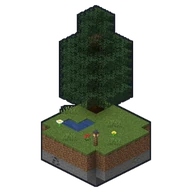
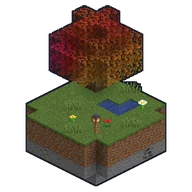
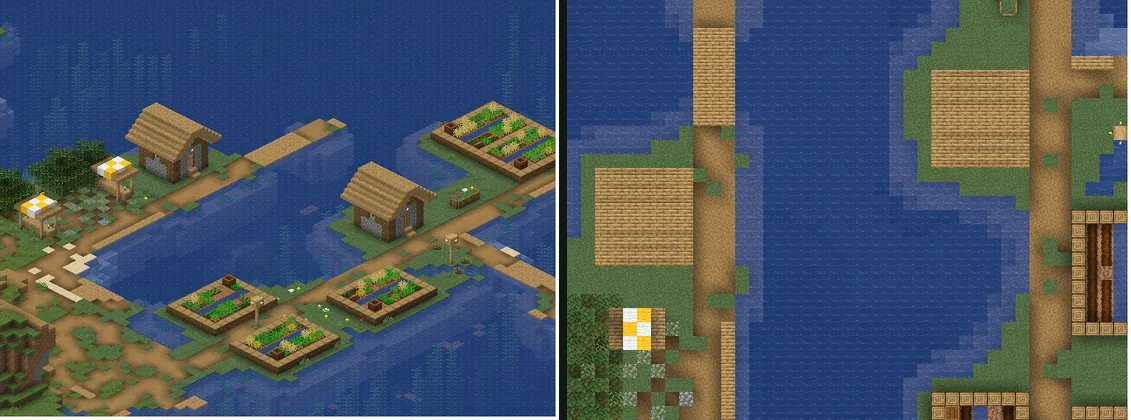
The same spot of the world twice: on the left at an angle from the side, on the right straight from above

In the browser

The live map

  • Two views: isometric, at an angle from the side, or straight from above; you switch between them.
  • Layers with towns, regions and the circles of the nations, each one shown or hidden on its own.
  • From the homepage: a click on a town's name in the picture opens the map right there.
OpenLive map

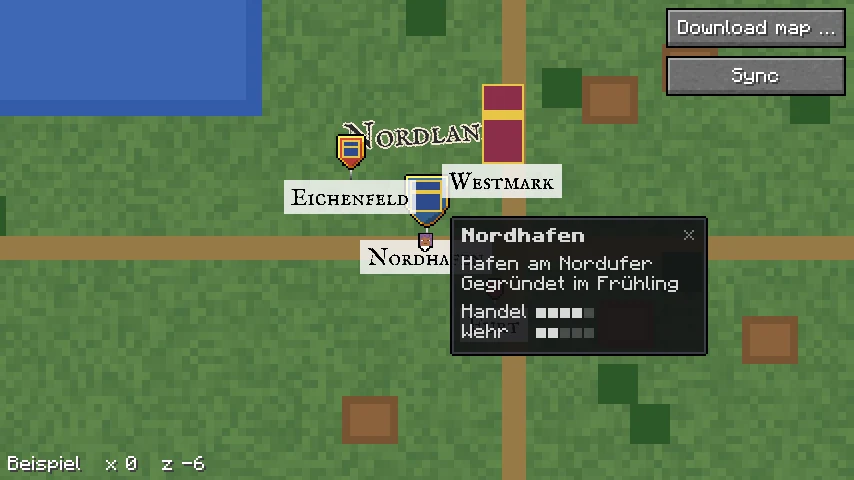
Heroic Map's full-screen map with a banner, pins and the info panel of the place Nordhafen

In the game · Heroic Map mod

Minimap and full-screen map

  • Minimap round or square. By default it turns with the direction you look, with your coordinates below it: x and z, if you like y as well, or none.
  • Frames: by default the "Biome" frame changes with the biome below you, from forest and mountains to desert and water. Plus six fixed ones: Grey, Wood, Paper, Compass, Clock and Cartographer.
  • Full-screen map: download the map from the server once; after that it is on your computer and needs no connection.
  • Towns as their nation's banner, other places from the server as pins with a coat-of-arms shield, symbol and name.
  • Regions, circles and lines of the nations, their names in old map lettering.
  • Info panel: point at a town, a place, a region or a circle on the full-screen map and its panel appears; a click keeps it open.
  • Waypoints: set them and pin them to the minimap, with chunk lines if you like.

DownloadHeroic Map

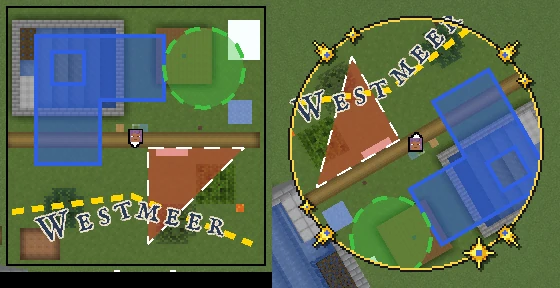
A region with a hole, a circle, a triangle, a line and the name Westmeer in map lettering on the minimap, north up and turned
Regions, circles, lines and map lettering, north up and turned.
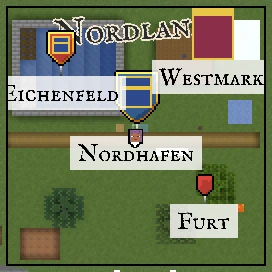
Pins in three sizes and a banner with their names on the minimap
Banners and pins with names.
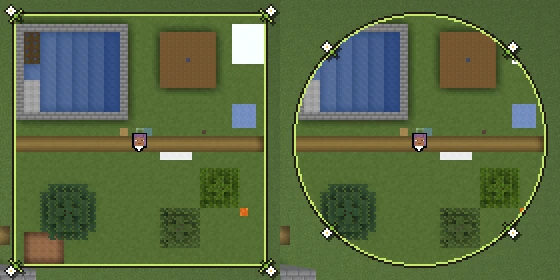
The minimap with the Biome frame, square and round
The "Biome" frame, square and round.

Heroic Map's keys and menu

InputWhat it does
.Opens and closes the full-screen map. The only key bound by default; change it under Controls, group "Heroic Map".
/hmapThe menu: minimap on or off, "Minimap zoom", "Other players", "Download map …", "Map list …" and "Settings …". In the menu you move the minimap by dragging it; the handle at its corner makes it larger or smaller.
"Settings …""Shape" (square or round), "Minimap resolution", "Chunk lines", "Rotate", "Frame", "Map storage", "Coordinates" (off, xz or xyz) and "Layers …", where you turn each layer on and off.
On the full-screen mapDragging moves it, the mouse wheel zooms, Esc closes it.
PointingOn the full-screen map, pointing at a town, a place, a region or a circle opens its info panel. A click keeps it open; ×, Esc or a click beside it closes it.
Right-click"Add waypoint", on a waypoint "Delete waypoint"; players who may also see "Teleport here".
Click, double-clickA click on a waypoint or another player centres it, a double-click pins it to the minimap.
Unbound"Show or hide minimap" and "Minimap zoom" also exist as keys; bind them under Controls, group "Heroic Map".

And the colourful leaves? They come from Colorful Leaves, our second mod: the server decides which trees wear which leaf colour, and the mod shows them to you.

Chapter 03 · Professions

Ten professions for your town.

On Terranova, professions don't belong to a single character but to your town. Together you raise the right buildings, work towards goals and unlock one level after another. Every completed level earns points towards your town level.

  1. 01

    Choose a profession

    In the town menu under “Professionen” you decide what your town works on. Only one profession is active at a time – the others pause and can be resumed later.

  2. 02

    Raise the buildings

    Every level needs matching buildings, from a fisher's hut to a cathedral. Once a building is finished, the team inspects and approves it.

  3. 03

    Reach the goals

    Fishing, mining, harvesting, brewing: whatever the citizens do for the active profession counts together.

  4. 04

    Complete the level

    Once buildings and goals are done, you complete the level with silver from the town treasury. That earns points and unlocks the next of four levels.

  1. 01 · Gathering

    Forestry

    Sawmills, forester's lodges and reforestation make sure the forest grows back.

    Goal
    Chop wood
    Buildings
    Sawmill → Timber yard → Large forest
  2. 02 · Gathering

    Mining

    Tunnels, rails and smelters bring up stone, coal and ore – all the way down to ancient debris.

    Goal
    Mine stone and ore
    Buildings
    Mine shaft → Foundry → Lift into the depths
  3. 03 · Gathering

    Fishing

    From a fisher's hut on the shore to a big fish market. Which fish bite depends on where you cast your line.

    Goal
    Catch fish
    Buildings
    Fisher's hut → Harbor → Fish market
  4. 04 · Gathering

    Farming

    Fields, barns and mills feed the town and supply the market.

    Goal
    Harvest crops
    Buildings
    Farmstead → Mill → Farm with orchards
  5. 05 · Processing

    Cooking

    Harvests become meals, plus beer, wine and sake – from a small brewhouse to a brewery of your own.

    Goal
    Cook and brew
    Buildings
    Brewhouse → Tavern → Brewery
  6. 06 · Processing

    Smithing

    Weapons and armour for war, from iron to netherite.

    Goal
    Forge war gear
    Buildings
    Smithy → Foundry → Master's hall
  7. 07 · Combat

    Monster hunting

    Mages, orcs, ore-lings, bandits and cyclopes: whoever hunts them keeps the lands safe.

    Goal
    Defeat foes and monsters
    Buildings
    Barracks → Watchtowers → Fortress
  8. 08 · Combat

    Faith

    Chapel, church and monastery give the town strength – the cathedral becomes a place of pilgrimage.

    Goal
    Defeat witches
    Buildings
    Chapel → Monastery → Cathedral
  9. 09 · And more

    Taming

    Stables, pastures and pens for tamed animals – from mounts to loyal companions.

    Goal
    Tame animals
    Buildings
    Stable → Cattle market → Breeding farm
  10. 10 · ???

    ???

    A tenth profession is in the works. We're not telling more yet.

    Goal
    ???
    Buildings
    ??? → ??? → ???

The professions arrive with the professions rework, planned for version 0.6 (see the roadmap). Goals and buildings may still change until then – the town menu always shows the current state.

Chapter 04 · Lands

Lands, towns & castles.

Terranova is a medieval world. If you settle down here, you don't build a base but a settlement – and settlements grow into towns, lands and nations.

  1. Nation

    Under one banner

    Several towns join together to form a nation. The capital leads, while leaders and council steer its course. Nations keep relations with one another: allied, neutral or hostile.

  2. Lands

    A town's territory

    Around every town lie its lands – fields, forests, mines and harbors that it claims and works. The higher the town level, the more land a town can hold. The nations rework will bring a new system for granting land.

  3. Towns & villages

    The heart of the land

    Towns have a mayor, deputies and a council, a treasury in silver and their professions. Villages are the smaller settlements in the lands: the fishing village on the coast, the mining village by the mine, the hamlet in the valley – often focused on a single profession.

  4. Plots

    A home of your own

    Within a town, an estate agent offers plots to buy or to rent. That way every citizen gets a place that is safe.

Castles

Strongholds of the lands.

Castles guard borders, passes and trade routes. They house barracks, armories and watchtowers and show from afar who the land belongs to. With the military profession, a simple guard wall grows step by step into a fully built fortress.

Medieval building style

Terranova lives from its building style. You don't have to be a pro – a few basic rules turn a house into a believable piece of the Middle Ages.

  1. Natural materials

    Cobblestone and stone bricks for foundations and walls, wood for timber framing and roofs. Concrete, glass facades and quartz cubes don't belong in the Middle Ages.

  2. Timber framing

    A frame of stripped logs, filled with a light material such as calcite or birch – the classic for houses.

  3. Steep roofs

    Build roofs from stairs and slabs, steep and with an overhang. Dormers and chimneys give them character.

  4. Depth, not flat walls

    Push beams, windows and floors forward or back. Even one block of depth brings walls to life; upper floors may overhang.

  5. Organic streets

    Medieval towns grow organically: winding alleys, a market square in the middle, the church as the highest point, walls and gates at the edge.

  6. Light and details

    Lanterns instead of glowstone, flower boxes, barrels, carts and gardens tell who lives and works here.

Chapter 05 · Wars

Wars & holy wars.

Not every dispute can be settled at the negotiating table. With the war update, conflicts between nations get a clear framework: it's about lands and strategic goals, not senseless destruction.

Already live

Diplomacy

Every nation decides how it stands towards the others: allied, neutral or hostile. These relations are the basis for alliances, trade – and every war.

War update

War

A war is an open conflict between hostile nations over lands.

  • A clear war goal instead of aimless destruction
  • Fixed rules for attack and defense
  • A clear outcome that decides the fate of the land
War update

Holy war

A holy war is fought in the name of faith. It's not only about land but about holy sites – the chapels, monasteries, cathedrals and places of pilgrimage that towns with the faith profession build.

The war update is a long-term plan. We'll announce in good time how wars and holy wars are declared, fought and ended – you can follow the progress on the roadmap.

Any questions?

Ask the community.

On Discord, the team and experienced players help you with your first steps – from setting up mods to founding a town.